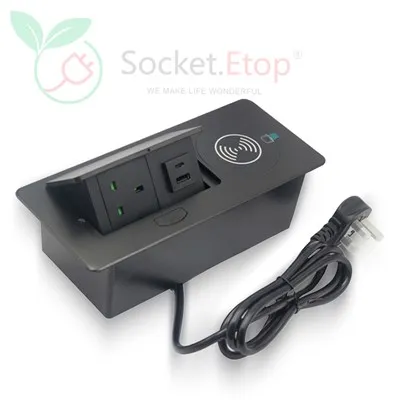
Hey there! If you're looking to spruce up your conference room and make it more functional, installing a desk socket is a great idea. As a desk socket supplier, we've helped loads of folks with this process, and we're here to share my tips with you.
Why Install a Desk Socket in Your Conference Room?
First off, let's talk about why you'd want to install a desk socket in the first place. In today's tech - savvy world, conference rooms are often filled with devices like laptops, tablets, smartphones, and even wireless presentation tools. Having a convenient power source right at the desk can make meetings run much more smoothly. No more fumbling around with long extension cords or searching for an available outlet on the wall.
Choosing the Right Desk Socket
Before you start the installation process, you need to pick the right desk socket for your conference room. There are several types to choose from, and each has its own advantages.
- Wireless Charger Flip Power Socket: This is a really cool option. It not only provides traditional power outlets but also has a wireless charging pad. It's perfect for modern devices that support wireless charging. You can check out more about it Wireless Charger Flip Power Socket.
- Desk Edge Clip On Socket: These are easy to install and don't require any major modifications to the desk. You can simply clip them onto the edge of the desk. They're great if you want a quick and temporary solution or if you don't want to drill holes in your expensive conference tables. Find more details Desk Edge Clip On Socket.
- Desktop Clamp Power Strip: This type of socket offers multiple power outlets and can be clamped onto the desktop. It's a versatile option that can handle multiple devices at once. For more info, head over to Desktop Clamp Power Strip.
Tools and Materials You'll Need
Once you've chosen your desk socket, it's time to gather the necessary tools and materials. Here's a basic list:
- Screwdriver (either flat - head or Phillips, depending on the socket)
- Drill (if you need to make holes for the installation)
- Measuring tape
- Pencil
- Electrical tape
- Wire strippers
Installation Steps
Step 1: Plan the Location
The first step is to decide where you want to install the desk socket. Consider the layout of the conference room and the position of the desks. You'll want to place the socket in a location that's easily accessible to all the people sitting at the desk. Use a measuring tape and a pencil to mark the spot on the desk.
Step 2: Prepare the Desk
If you're installing a socket that requires holes to be drilled, now is the time to do it. Make sure you use the right size drill bit for the socket. If you're using a clip - on or clamp - on socket, you can skip this step.
Step 3: Connect the Wires
Before you start connecting the wires, make sure the power is turned off at the breaker box. This is really important for your safety. Most desk sockets come with clear instructions on how to connect the wires. Usually, you'll have to connect the live, neutral, and ground wires. Use the wire strippers to strip the ends of the wires and then connect them to the appropriate terminals on the socket. Wrap the connections with electrical tape to ensure they're secure.
Step 4: Install the Socket
Once the wires are connected, it's time to install the socket. If it's a drilled - in socket, carefully place it in the hole and use the screwdriver to secure it. For clip - on or clamp - on sockets, simply attach them to the desk as per the instructions.
Step 5: Test the Socket
After the installation is complete, turn the power back on at the breaker box. Plug in a device, like a phone charger, to test if the socket is working properly. If everything seems fine, you're good to go!
Safety Tips
- Always turn off the power before working on electrical installations.
- Make sure the wires are connected correctly to avoid short circuits.
- If you're not confident in doing the installation yourself, it's best to hire a professional electrician.
Maintenance and Care
To keep your desk socket in good working condition, here are a few maintenance tips:


- Regularly check the socket for any signs of damage, such as cracks or loose connections.
- Clean the socket with a dry cloth to remove dust and debris.
- Avoid overloading the socket with too many devices at once.
Let's Talk Business!
Installing a desk socket in your conference room can really enhance its functionality and make your meetings more productive. If you're interested in purchasing high - quality desk sockets, we've got you covered. Whether you need the Wireless Charger Flip Power Socket, Desk Edge Clip On Socket, or Desktop Clamp Power Strip, we offer a wide range of options to suit your needs.
We're here to assist you with your purchase and can provide professional advice on the best desk socket for your specific situation. Don't hesitate to reach out if you have any questions or want to discuss your requirements for bulk purchases. Let's make your conference room a more tech - friendly place together!
References
- Electrical safety guidelines from local regulations
- Product manuals provided by the desk socket manufacturers